

If you need to send a password, API key, or database credential to someone outside your system, the safest pattern is to encrypt it in the sender's browser, send only ciphertext to a server, and deliver the decryption key to the recipient in a way the server never sees. This is the essence of zero‑knowledge sharing. Below is a practical encryption example that shows how to send credentials with zero knowledge, plus a simple workflow you can adopt today.
What "zero knowledge" looks like in practice
Zero knowledge in this context means the service that relays your message cannot read it. The encryption key never leaves browsers, the server sees only ciphertext, and the secret is destroyed after use.
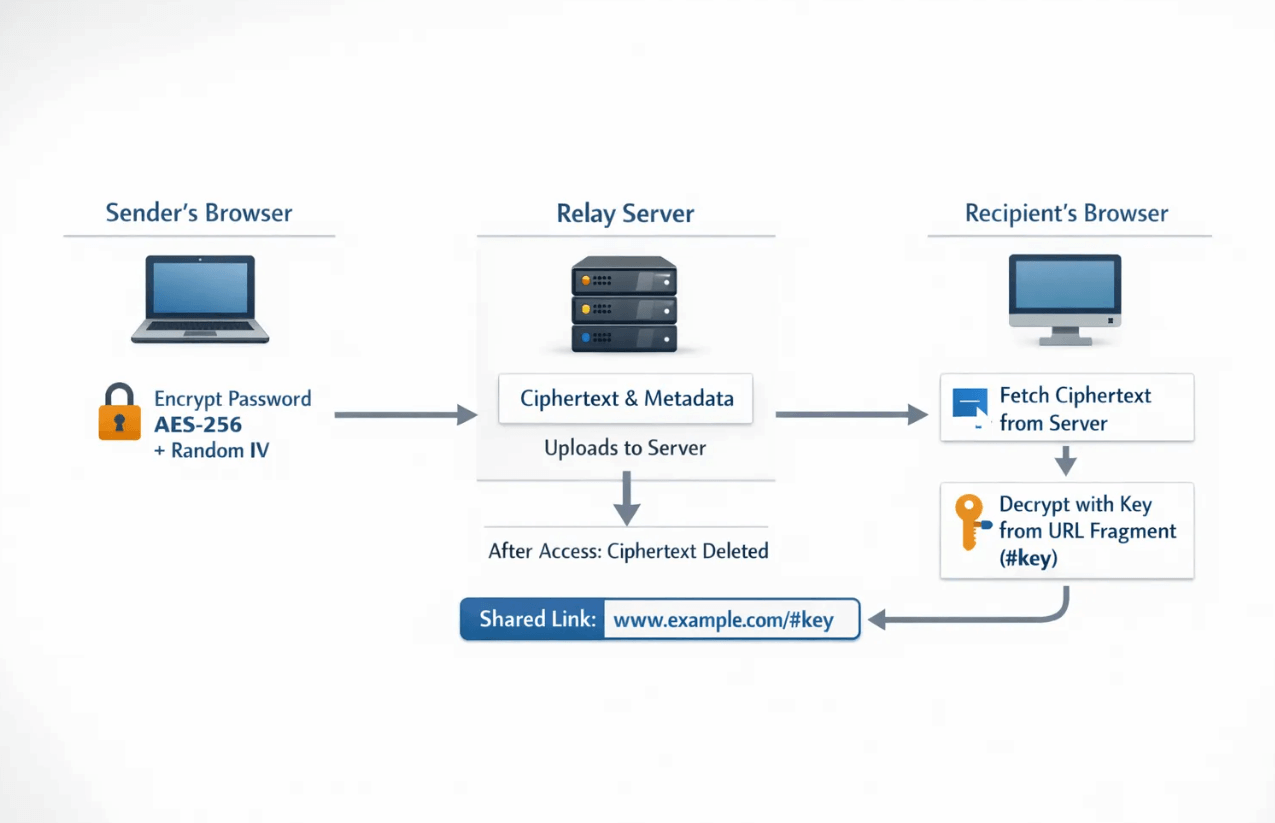
Two details make this work:
- Client-side encryption, so plaintext exists only in the sender's and recipient's browsers.
- Key in the URL fragment, so the key is never transmitted to the server. The fragment, everything after the #, is not sent in HTTP requests, see RFC 3986, Section 3.5.
For authenticated encryption, modern implementations typically use AES-GCM with a 256-bit key, which is standardized by NIST, see NIST SP 800-38D. If you want a quick primer on the algorithm and why organizations trust it, read our plain-English guide, AES 256 encryption explained for non engineers.
A minimal browser encryption example (education only)
The following JavaScript shows the core of a zero-knowledge flow using the Web Crypto API. It generates a random 256-bit key, encrypts a credential with AES‑GCM, uploads only ciphertext and IV to a server, then builds a link that carries the decryption key in the fragment.
Important, this code is for learning, not production. As OWASP advises, do not roll your own crypto or protocol in production, use vetted libraries and services, see the OWASP Cryptographic Storage Cheat Sheet and the Web Crypto API docs.
// Minimal zero-knowledge example with AES-GCM (education only)
// 1) Encrypt in the browser  2) Upload only ciphertext  3) Put key in URL fragment

const te = new TextEncoder();
const td = new TextDecoder();

function toB64url(buf) {
  const bytes = buf instanceof ArrayBuffer ? new Uint8Array(buf) : new Uint8Array(buf.buffer || buf);
  let bin = "";
  for (let i = 0; i < bytes.length; i++) bin += String.fromCharCode(bytes[i]);
  return btoa(bin).replace(/\+/g, "-").replace(/\//g, "_").replace(/=+$/g, "");
}

function fromB64url(s) {
  const base64 = s.replace(/-/g, "+").replace(/_/g, "/") + "===".slice((s.length + 3) % 4);
  const bin = atob(base64);
  const out = new Uint8Array(bin.length);
  for (let i = 0; i < bin.length; i++) out[i] = bin.charCodeAt(i);
  return out;
}

async function createZeroKnowledgeLink(secret) {
  // 256-bit AES-GCM key
  const key = await crypto.subtle.generateKey({ name: "AES-GCM", length: 256 }, true, ["encrypt", "decrypt"]);

  // Never reuse an IV with the same key
  const iv = crypto.getRandomValues(new Uint8Array(12));

  const plaintext = te.encode(secret);
  const ciphertext = await crypto.subtle.encrypt({ name: "AES-GCM", iv }, key, plaintext);
  const keyRaw = await crypto.subtle.exportKey("raw", key);

  // Send only ciphertext + IV to your relay API
  const payload = {
    ciphertext: toB64url(ciphertext),
    iv: toB64url(iv),
    expireViews: 1,         // one-time access
    ttlSeconds: 600         // 10-minute expiry
  };

  // Replace with your backend endpoint that stores ciphertext ephemerally
  const res = await fetch("/api/secret", {
    method: "POST",
    headers: { "Content-Type": "application/json" },
    body: JSON.stringify(payload)
  });
  const { id } = await res.json();

  // Put the decryption key in the URL fragment so the server never receives it
  const keyB64 = toB64url(keyRaw);
  const link = `https://your-app.example/secret/${id}#k=${keyB64}`;
  return link;
}

// Recipient's browser logic would do the reverse: fetch ciphertext, import key from fragment, decrypt locally.
async function openZeroKnowledgeLink(id, keyB64) {
  const r = await fetch(`/api/secret/${id}`);   // server should return 404 and delete after first read
  const { ciphertext, iv } = await r.json();

  const keyRaw = fromB64url(keyB64);
  const cryptoKey = await crypto.subtle.importKey("raw", keyRaw, { name: "AES-GCM" }, false, ["decrypt"]);

  const pt = await crypto.subtle.decrypt(
    { name: "AES-GCM", iv: fromB64url(iv) },
    cryptoKey,
    fromB64url(ciphertext)
  );
  return td.decode(pt);
}
Notes for accuracy and safety:
- AES-GCM requires a unique IV for each encryption with a given key. Use a random 96-bit IV per message and never reuse it.
- The server must enforce one-time access and deletion on first retrieval. Keep only ciphertext and minimal metadata, never store keys or plaintext.
- If you need human-entered passphrases, use a KDF like PBKDF2 or Argon2 to derive a strong key before AES-GCM. For most ad-hoc credential handoffs, a random key in the URL fragment is simpler and stronger.
If you would rather not build or maintain this yourself, Nurbak already implements a zero-knowledge model with AES‑256, one-time links, no data logging, audit access logs, and a clean admin dashboard. See our breakdown, Client-Side vs. Server-Side Encryption: Why It Matters for Your Secrets.
Step-by-step: sending credentials with zero knowledge
Here is a concise, repeatable process that teams use for API keys, database passwords, SSO break-glass credentials, and recovery codes.
- Prepare the credential. Scope it to least privilege, add an expiration, and if possible create a temporary value that you will rotate after handoff.
- Create a one-time, self-destructing link. Use a zero-knowledge tool that encrypts in the browser and deletes the ciphertext after the first access or short TTL.
- Deliver context and the link on separate channels. Send the link through your normal channel and send any context or instructions in a second channel. This reduces accidental preview risks and helps phishing-resistant verification.
- Confirm receipt. Ask the recipient to confirm they have stored the secret in their password manager, then immediately revoke or rotate any temporary credentials.
- Record the event. Keep audit evidence that a transfer occurred without storing plaintext. Tools like Nurbak provide audit access logs that record access without compromising content.
What each party can see at each step
| Step | Sender's browser | Relay server | Recipient's browser |
|---|---|---|---|
| Create link | Plaintext before encryption, then key and ciphertext | Ciphertext and metadata only | Nothing yet |
| Deliver link | URL with key in fragment | No key, no plaintext | URL with key in fragment |
| Open link | Nothing new | One-time read, deletes ciphertext | Decrypts ciphertext locally, sees plaintext |
This data minimization is the heart of zero-knowledge sharing. There is nothing useful to exfiltrate from the relay service because it never possesses the key.
Threats to plan for, with mitigations
Even a strong cryptographic design can fail if you ignore operational risks. Address these common issues.
- Link previews and scanners. Some chat and email systems fetch links automatically, which can consume one-time links. Mitigate with a short TTL, one-time access, user instruction to copy and paste the link into a browser, and consider sending the link as plain text without automatic unfurling when possible.
- Phishing and domain confusion. Train recipients to verify the domain before opening any secret link. Consider a pre-shared phrase or call for verification when stakes are high.
- Device compromise. Zero-knowledge links protect data in transit and at rest on the relay, but they do not protect a compromised endpoint. Encourage recipients to open links only on managed or trusted devices.
- Credential reuse. Always rotate or revoke temporary credentials after use. Treat the transfer as successful only after you have removed the backdoor of persistence.
For broader guidance on handling secrets, consider the OWASP Secrets Management Cheat Sheet.
Why zero-knowledge links beat email and tickets for one-off credentials
| Method | What the provider can read | Persistence risk | Fit |
|---|---|---|---|
| Email or ticket | Plaintext available in multiple systems and backups | High, copies exist for years | Not suitable for credentials |
| Password manager item share | Varies by vendor, some are end-to-end encrypted | Medium, requires account and coordination | Good for long-term sharing inside one org |
| One-time zero-knowledge link | Only ciphertext, no key, no plaintext | Low, single use with short TTL | Ideal for cross-org, ad-hoc handoffs |
If you need to send a secret quickly to a vendor, freelancer, or client, one-time zero-knowledge links offer the best mix of speed, safety, and auditability.
Compliance considerations in 2026
- SOC 2 and ISO 27001. These frameworks expect least privilege, minimal retention, and auditability. Zero-knowledge links help you meet these expectations by eliminating persistent plaintext and providing traceable access events.
- GDPR and Right to Erasure. Email and chat propagate copies across systems and backups, which complicates deletion requests. Ephemeral, self-destructing links help you minimize retained personal data. For a deeper dive, read our guide, GDPR Compliance and the Right to Be Forgotten: Why You Need Self-Destructing Links.
When to build vs. buy
The example above illustrates how the cryptography works. Turning it into a production-grade service requires more work, including link safety against scanners, one-time deletion guarantees, reliable expirations, rate limiting, telemetry, and compliance reporting. Most teams prefer not to own this surface area.
Nurbak implements the zero-knowledge pattern out of the box, with client-side AES‑256 encryption, self-destructing links, no data logging or storage, audit access logs, and an admin dashboard for policy and analytics. If you just want a secure, professional way to hand off secrets, it is faster and safer to use a purpose-built tool than to assemble your own.
FAQ
What is a zero-knowledge link? A one-time link where encryption happens in the browser and the decryption key is embedded in the URL fragment. The server only stores ciphertext and cannot decrypt it.
Why put the key in the URL fragment? The fragment is not sent to the server during HTTP requests, so the server cannot learn the key. The recipient's browser uses it locally to decrypt.
Is AES‑256 GCM secure for this use case? Yes, when implemented correctly with a unique random IV per message and authenticated encryption. See NIST SP 800-38D. Avoid custom schemes and use vetted libraries.
Does this replace password managers? No. Use a password manager to store long-term credentials. Zero-knowledge links are ideal for ad-hoc, cross-organization transfers that should not persist in email or chat.
How do I avoid link previews consuming a one-time link? Use tools that support short expirations and one-time access, instruct recipients to copy the link into the browser, and avoid channels that auto-fetch links. Separate the link from surrounding context when possible.
Can I audit transfers without storing plaintext? Yes. You can log metadata about link creation and access events. Nurbak provides audit access logs while keeping message content zero-knowledge.
Ready to send credentials with zero knowledge, without building your own crypto or protocols? Create a self-destructing, client-side encrypted link in minutes with Nurbak. Learn how the architecture works in Client-Side vs. Server-Side Encryption or get a straightforward walkthrough in How to share a secret with one-time links. When you are ready, visit Nurbak to generate your first zero-knowledge link.